Better cables always help, but everyone has their own cost pain threshold - still many fewer people are posting about the need for expensive cables for the bridge than other places in the system. I’d do as you mentioned and start with a good CAT 6 and a good switch (not just some old wireless router that you aren’t using for something else
You know, since the current and voltage are AC I never know what people (in particular fuse sellers) are talking about when they mention the direction of the current flow. The best I can come up with is the direction of net power flow, e.g. from the wall to the heat in the box and less so to the output signal… When I look at my fuse holder in my Jr I don’t see any keying (tho it could be there) so I don’t know if PS Audio is carefully monitoring the orientation of the fuse holder and/or which wire plugs into which spade on the fuse holder or not. Still since the fuse is readily accessible from outside the unit, why not listen both ways - if you can’t hear a difference does it matter?
EfeTe said
Ditto here - silver or black, doesn't matter, these beauties need to be shown off.
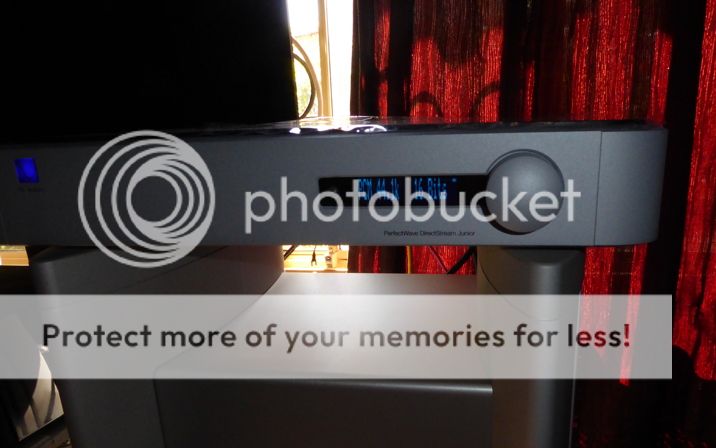
I’d like to know how users feel like the volume method (nice looking knob on the right) of the Juniors vs the bigger DirectStream, its volume intervals and experience of use…
In terms of experience of use, I have owned Directstream and now I own Direcstream Junior. I like the mechanical implementation of the DS Junior volume control very much. The tactile response of the volume knob gives the hardware a sense of quality above its price point. Volume = 100 (attenuation OUT) gives me a normal volume listening level with DS Junior connected direct to the unbalanced voltage input of the power amplifier. With Directstream, I always set volume = 100 as I used a separate pre-amp for volume control.
An observation about Bridge 2, it doesn’t seem to support internal web page access, whereas, if I recall, Bridge 1 did.
Ted Smith said
...I'd do as you mentioned and start with a good CAT 6 and a good switch (not just some old wireless router that you aren't using for something else :)
Just to elaborate on the choice of switch, as I have some experience here. Switches definitely make a difference to the experience. I use Enterprise Class switches, both un-managed and managed. There is a particular high-end networking infrastructure brand with switches that are designed for AV applications (I won't mention the brand). They have un-managed AV priority switches that seem to work well for this application. Their uber-expensive ($3000+) managed switches need to be configured for this application (i.e. Kaleidescape, Sonos etc), as the nature of the AV traffic through the switch can cause various ports on the switch to randomly lock up. So my recommendation is to go for a much cheaper unmanaged AV priority switch.
EfeTe said
Ditto here - silver or black, doesn't matter, these beauties need to be shown off.
I’d like to know how users feel like the volume method (nice looking knob on the right) of the Juniors vs the bigger DirectStream, its volume intervals and experience of use…
In terms of experience of use, I have owned Directstream and now I own Direcstream Junior. I like the mechanical implementation of the DS Junior volume control very much. The tactile response of the volume knob gives the hardware a sense of quality above its price point. Volume = 100 (attenuation OUT) gives me a normal volume listening level with DS Junior connected direct to the unbalanced voltage input of the power amplifier. With Directstream, I always set volume = 100 as I used a separate pre-amp for volume control.
An observation about Bridge 2, it doesn’t seem to support internal web page access, whereas, if I recall, Bridge 1 did.
Tim said
But since the Bridge is receiving files over ethernet, rather than "audio" (I know I am generalizing) I wonder about the benefit of anything beyond a cable that is well constructed and meets the spec (I use Cat 6 for everything that is wired at home). How are people's experiences? I do not mind buying a good cable, but anything beyond the AQ Cinnamon seems overkill for this application.
I went from a generic cat6 to AudioQuestion Vodka (two runs, NAS to switch and switch to Bridge). The difference was clearly audible and worthwhile, although not of the "earth shattering" variety. I did not try the AQ Diamond since that was definitely out of my price range.
EfeTe said
Ditto here - silver or black, doesn't matter, these beauties need to be shown off.
I’d like to know how users feel like the volume method (nice looking knob on the right) of the Juniors vs the bigger DirectStream, its volume intervals and experience of use…
In terms of experience of use, I have owned Directstream and now I own Direcstream Junior. I like the mechanical implementation of the DS Junior volume control very much. The tactile response of the volume knob gives the hardware a sense of quality above its price point. Volume = 100 (attenuation OUT) gives me a normal volume listening level with DS Junior connected direct to the unbalanced voltage input of the power amplifier. With Directstream, I always set volume = 100 as I used a separate pre-amp for volume control.
An observation about Bridge 2, it doesn’t seem to support internal web page access, whereas, if I recall, Bridge 1 did.
I know this would do my soon-to-arrive Direcstream Junior’s lovely knob justice but… Besides the mechanical implementation I suppose the unit’s remote control can be learned by, say, a Logitech Harmony and be operated from there as well? I ordered my futon chair so low specifically in order to have my ears aligned with he speakers’s tweeter, and so getting up to turn the knob will be a bit of labour
Congratulations on your absolutely stunning Junior -mine is arriving in a few days’s time fingers crossed!
Yes, the IR remote that ships with the Directstream Junior is keyed for the DAC, the future pre-amp, and future transport. The button functions can be learned in the normal way into a learning remote. The remote is nice: discrete on/off buttons, backlighting; hopefully they’ll do an iOS control App for it (I think Dennis mentioned elsewhere that project is underway).
First listening impressions. Out of the box Directstream Junior has a gorgeous treble and outstanding separation of instruments in the performance space. Bass energy is very undernourished at this stage, I expect it will improve over time (I’m only at 18 hours at this point). I’m listening to Chris Rea - New Light Through Old Windows. The harmonic complexity of voice is missing, however I’ll qualify that by declaring the mid-driver of one of my Magico speakers is faulty. A repair tech is coming here on Friday to assess the speaker. Thankfully a field repair seems to be an option and I might not need to send the speaker away.
brodricj said
Yes, the IR remote that ships with the Directstream Junior is keyed for the DAC, the future pre-amp, and future transport. The button functions can be learned in the normal way into a learning remote. The remote is nice: discrete on/off buttons, backlighting; hopefully they'll do an iOS control App for it (I think Dennis mentioned elsewhere that project is underway).
First listening impressions. Out of the box Directstream Junior has a gorgeous treble and outstanding separation of instruments in the performance space. Bass energy is very undernourished at this stage, I expect it will improve over time (I’m only at 18 hours at this point). I’m listening to Chris Rea - New Light Through Old Windows. The harmonic complexity of voice is missing, however I’ll qualify that by declaring the mid-driver of one of my Magico speakers is faulty. A repair tech is coming here on Friday to assess the speaker. Thankfully a field repair seems to be an option and I might not need to send the speaker away.
Thanks -surely after 100 hours or so (probably even 150?) you’ll start to hear further improvements. Tackling CR’s voice must be challenging for every piece of equipment as it’s so unique and so odd! Ditto Leonard Cohen.
So glad to hear about the results separation wise and in the treble department, as those two areas (sep + a tad “metallic” higher frequence reproduction) are the main two for me to have decided to try and improve from my current McIntosh D100 dac.
Really promising. Let alone the absolute REVOLUTION in getting those mere 44.1/16 FLAC pcm’s to sound and reveal to their absolute maximum!
EfeTe said
Also, hopefully the mid driver thing is no biggie in the end!
It should be just a straight forward mid-driver replacement. The unknown at this stage is whether Magico are going to pay for it.
This is only a temporary arrangement, Directstream Junior sits on top of a dm88 mono-block, and the stack sits next to Magico S3. Hopefully PerfectWave Transport 2 will be added to the collection soon (it will sit on the other dm88 mono-block, preserving the symmetry). The speaker cable is Audioquest CV-8. The interconnect is Audioquest Diamondback RCA. The digital cable is Audioquest Video1.
To swap back to my normal listening arrangement (Ayon DAC + Halcro dm8 pre-amp) is simple, just flip the input selector switch on the back of each power amp (the dm88 has 4 selectable input sources).
So glad to hear. This unit should be so interesting at this price point if it does give you “85 %” of the big lad’s. Further improvement in the next few days I’m sure.
If you had any objections to make to the Junior thus far, what would those be?
brodricj said
My Junior has been playing continuously since Tuesday. Certainly more nourishment in the bass now than there was 5 days ago.
Similar here - been playing since Friday. Sounded great right out of the box, but tight as you would expect. Beautify made. First impression was "wow, playback from Tidal sounds great", but it responds really well to hi-res files.
I am having an issue with DSD playback - the files will not start playing, just never seem to load to the DSJ. I am using a QNAP HS-210 NAS with Minimserver and BubbleUPNP server installed and controlling with Lumin on my iPad. Everything else works great (Tidal, PCM of all rez from NAS). Any thoughts? Figure there is something I am forgetting…
I am having an issue with DSD playback - the files will not start playing, just never seem to load to the DSJ. I am using a QNAP HS-210 NAS with Minimserver and BubbleUPNP server installed and controlling with Lumin on my iPad. Everything else works great (Tidal, PCM of all rez from NAS). Any thoughts? Figure there is something I am forgetting…
Did you add the “dsf:dopwav” in the stream.code line? You find that line on MinimWatch under “Properties” and “System”.
Thanks! - that must be it as I do not have Minimwatch installed. I think I will live without DSD playback until Roon comes (I only have a few DSD titles).
You really do need MinimWatch on a networked PC–how else are you doing things like rescanning after you add files to your library, telling Minim which folders on your NAS to look at for music, etc? (Maybe there’s something about the QNAP version of Minim that I don’t know; all my experience has been with Minim on a Synology.) MinimWatch is a little program, no trouble to install and you can enjoy your DSD right now.
magister said
You really do need MinimWatch on a networked PC--how else are you doing things like rescanning after you add files to your library, telling Minim which folders on your NAS to look at for music, etc? (Maybe there's something about the QNAP version of Minim that I don't know; all my experience has been with Minim on a Synology.) MinimWatch is a little program, no trouble to install and you can enjoy your DSD right now.
Using the Lumin app and I would force a Minimserver rescan if anything added to the music library via the console. I was using an Auralic Aries and Roon before the DSJ, so had not needed to use Minimserver in a while. Minim/Bubble/Lumin are interim solutions until the Roon integration is released.
I forgot to ad my concern with installing Minimwatch on this Mac is the need for Java. Work laptop - Roon is OK, Java no
Thanks though. Besides the DSJ, I am enjoying this forum too…
you might convert your few DSD files to DoP “offline”. Not sure if there is a way to do this on a Mac. I have used foobar (Windows) to create such DoP files.
I think I may have discovered a gremlin in the operation of DSJ, or at least with my unit. When I invoke MUTE with the remote control the M flag appears on the display and the sound is muted, as you’d expect. Then if you VOL+ or VOL- using the remote the volume ramping stages through the levels with a “thump”, but if you use the Volume stepper dial the volume changes (sound) is normal. The M remains on the display despite the remote control volume ramping. You need to cancel the mute with the MUTE button for the volume ramping via the remote to return to normal.
I would expect if the DSJ is put into MUTE, then either MUTE, VOL+ or VOL- will automatically cancel the mute and the M flag will disappear. With DSJ in MUTE, VOL+ and VOL- results in abnormal sound output with the M flag still in view.