PS Audio Music Server In The Pipeline?

It depends if you are ripping in WAV or some other format. dBpoweramp (Windows) is very good, the database is OK. My now defunct ripper/NAS/streamer did not have editing, but I used an OSX app called TAG. No copying was needed. TAG on my laptop would edit and re-write metadata on the NAS.

One factor is that a properly build ripper will not reject disks. My unit did 800 discs without a single failure. dBpoweramp was far less successful, with lots of failures.

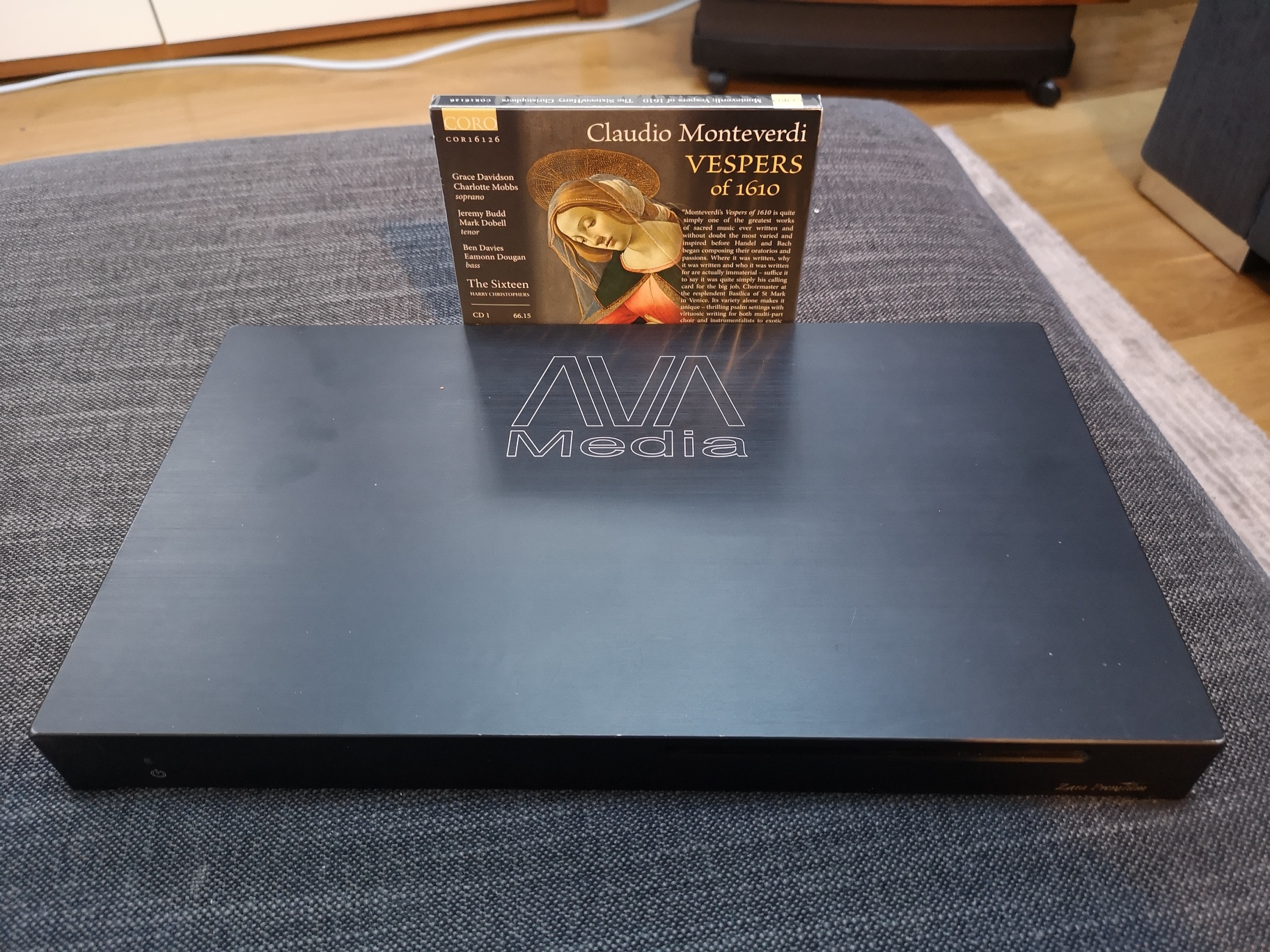
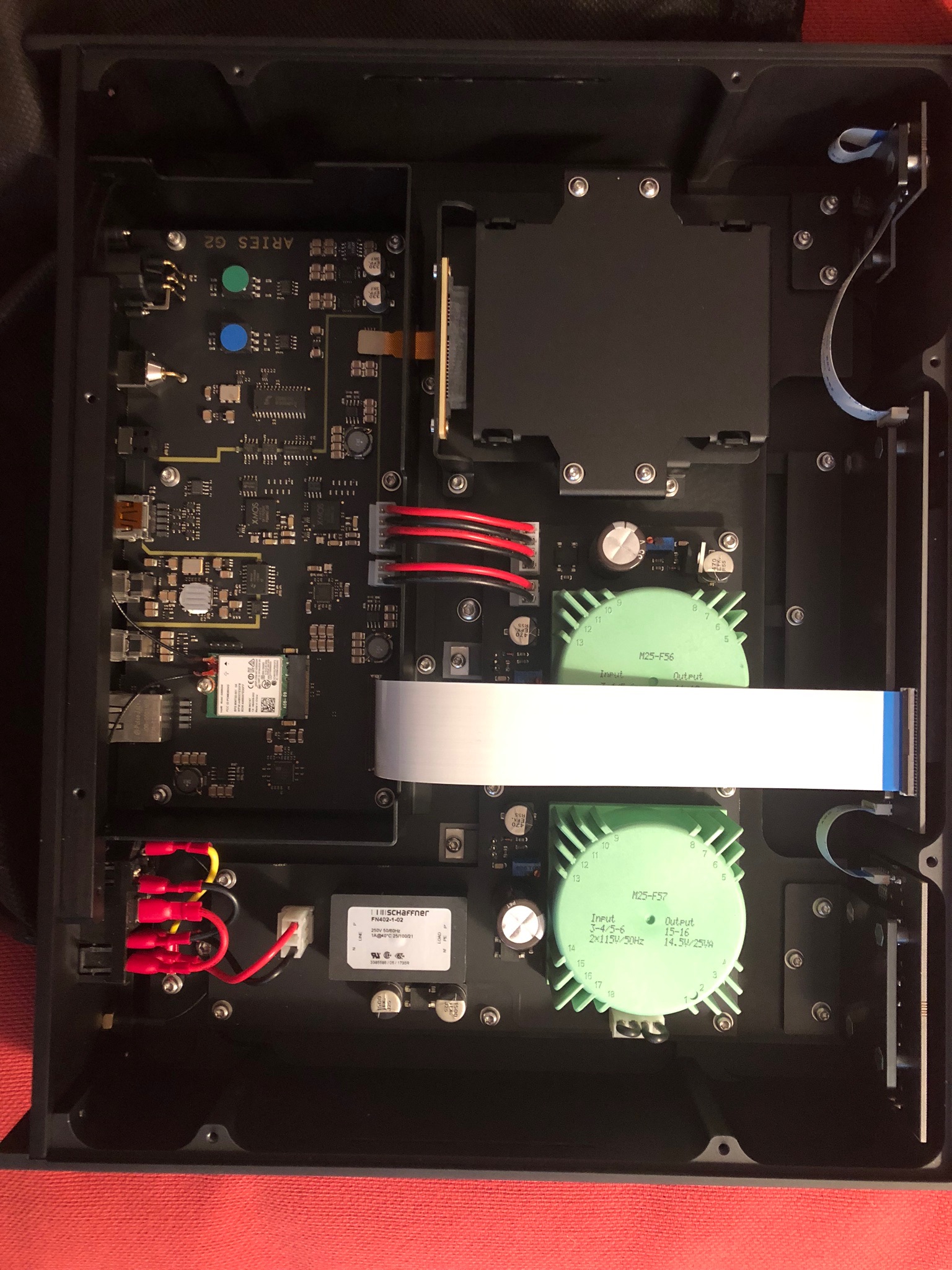
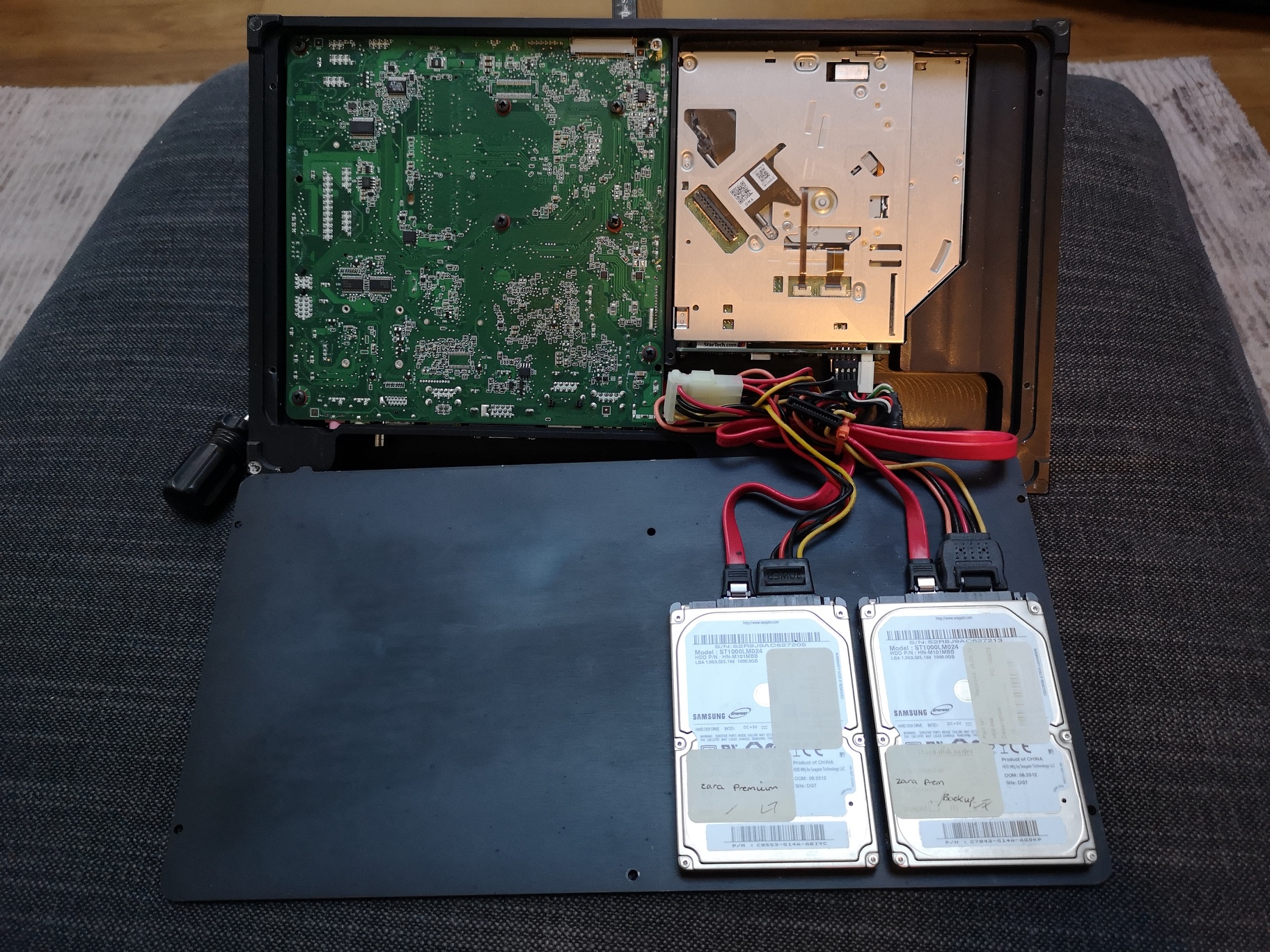
A few pictures of my defunct ripper/server/streamer. Died because of the third-party software, the same as Naim used but have now replaced.
This unit was designed and built by a commercial server business, so it’s incredibly compact, includes an internal back-up disk and the entire unit is machined out of aluminium. The enclosure is machined exactly for the drive, processor and cables with no wasted space.
I’ve not come across any audio company fabricating units this well.

1 Like

i5 is well above Roon minimum spec. The Innuos uses an N4200 chip, slightly below i3 minimum spec, but has advantages. Few people use Roon to its limit, which Roon specify requiring i7, or even close. I don’t run any filters.

This is a good reason for constant ripping I can understand.
If you intentionally pass on the higher resolution available from downloads and plan to continue buying physical media (as long as it’s available for the majority of music you like) and then rip it and have the discs as backup, that’s a personal strategy. In case of a large collection you just have to be aware that problems happen to a library and you will probably be forced to rip all the stuff again from time to time.

I also understand that people want an all in one unit that does everything without much hassle.
IMO it’s just important to know that this idea is quite limited when streaming not from online services but from local files (as I do). IMO an integrated SSD or hard drive inside a Server is a valid idea, but for most listeners with a large collection will soon reach it’s storage limit…means…you have to attach add. external disks or a NAS in a network (which ends the ā€œone box ideaā€). Even with a smaller collection that fits on the internal drive you should dearly backup your data, as there are a lot of chances you will corrupt your library or loose files from time to time (if you’re not planning to have all physical media in the background and rip it all over again). Any kind of reduced manual or network backup concept will again drag you apart from the ā€œone box ideaā€. In case you want or need to restructure your library you’ll hardly do that by a tablet but from a PC…again you have another unit involved.

For people who really want to make full use of the benefits of the meta data of a server solution, I could name a dozend of important library administration functions of a server SW and meanwhile I know that from time to time one will want to modify library structure or has to reimport restored files without treating them as newly added etc. etc. All this can cause errors and necessary restores.

So finally imo the ā€œone box server ideaā€ is limited to quite small collections and demands if you want to be safe in case of problems. Otherwise local streaming stays noticably more complicated than spinning discs. I love it as I can manage it (even better with external solutions)…but I guess many who think simple now and dream of one box might be surprised later on.

All this is why to me the Octave server (in case there are no important SW functions intentionally cut for Bridge) is mainly a more or less better sounding Bridge in an external box with quite the same surrounding technical demands for a serious streaming user. For me this would be perfect in case I’m willing to pay the money connected to the server unit, cabling etc. for the related sound improvement. Others will be disappointed that having this one server box probably doesn’t solve all the upcoming demands (even if Octave will have the most convenient SW ever).

I’m sure there are many contrary opinions, but this is my experience.

ā€œI want my music to belong to me!ā€

I hate to point out that you don’t own music on CD any more than you do for a download. Read the small print - see below.

Moroever, if you buy music on Qobuz, and others like Hyperion, you can download it any time you like. If you lose or damage a CD, good luck getting a free replacement.

An interesting 2018 statistic for classical music lovers: ā€œWhen it comes to classical music, people are still buying physical albums too. CDs still account for 60 per cent of all sales, up 7 percent compared to 2017.ā€ - Figures from the UK’s record label association.

No SACD as it is illegal to rip and copy. Certainly XRCD and HDCD Arte easy enough to rip and store though we weren’t planning on a decoder. UHQCD is easy and I believe MQACD is as well though I should check.

Bottom line we are using a high quality DVD ripping device (in the upcoming transport) so anything playable on a DVD can be ripped and stored (except SACD).

1 Like

Just for the record, DBpoweramp checks the rip with a checksum against a database of others who have ripped the same disks. If you are having problems with DBpoweramp, it may be because your CD drive is getting real read errors. If you aren’t having problems with the same drive and other SW, you might be introducing errors in the copy that aren’t caught. Unless the ripper does it for you (taking even more time), the only way to check is a read and compare of the original and the ripped version.

As to dedicated server hardware, the issue I have with the notion is that software compatibility is not guaranteed, you are at the mercy of the vendor’s development schedule, and there may be hidden restrictions in the server SW that will annoy you.
I returned an Auralic Aries G1 even though it sounded very good, because it would not accept playlists longer than 999 tracks and was just one more OS and application SW to keep up to date and running.

My choice is server apps on Mac or Android because I have more SW choices - I don’t need or want yet another OS & hardware platform involved.

1 Like

Thanks Paul!

Exactly eldrick!
To add to your post, there are specific settings to ensure you get the best quality rip.
Here they are:
in options:
Ripping method- Secure and also check Ultra Secure in submenu
AccurateRip- check all boxes
Bottom of Main Window Rip to- FLAC
Ensure that Lossless Uncompressed is selected on bottom middle sub-window

A post was split to a new topic: Danes Online

ELK you just don’t get a bell…

It can be hard to always keep track of ELK - more love Denmark - Thanks bro

I do find it amusing that you returned the Aries G1 because it wouldn’t accept playlists over 999 tracks and take an ideological view against proprietary hardware platforms.

I’ve used Auralic Aries and Auralic Aries Mini since they came out. In the UK their breakthrough product was the Vega DAC, they were so popular they were being resold on auction sites at a 20% premium to the new price. Auralic have never looked back. Their products are hugely popular, invariably get rave reviews and a significant part of that is their spectacularly good and robust operating system, Lightning and Lightning Server. I use a Devialet Expert with an Aries Mini acting as server, so have run the Devialet using Bubble uPnP over Android, MConnect Pro on iOS and Android uPnP, jRiver and Audirvana+ on OSX over Devialet Air, and as far I’m concerned nothing comes close to Auralic’s Lightning for ease of use and functionality. The G1 had also received rave reviews and Octave will have to go up against it, and the G1 is half the price.

Alan Sircom reviewed the G1, his first Auralic review and started by questioning why everyone loved their products. It’s here and he said:


I quote: ā€œIt’s important enough that if I were one of the big names in this field, I’d be worried about this product. Worried not just because it’s got a great spec, but more because it actually sounds really good. I mentioned the absence of Lightning connectors, but the G1 is entirely supported by the Lightning DS app, and this is an excellent interface, especially if used with Roon (the G1 is Roon Ready), Tidal, and especially Qobuz Studio.ā€

I’m extremely reluctant to stop using the Aries Mini, which is also Roon Ready, but I want a decent Roon Server and only one box going to the Devialet.

As to your playlist point, I saw you engaged with the owner of Auralic. He made the point that it had been designed that way years ago and he said ā€œUnfortunately we will not increase that number. For average track at 3 mins length, 999 tracks means total playback length of 50 hours, more than two days, this is sufficient for most people’s need.ā€ He gave you an alternative solution, you disagreed, went on about other software and he disengaged, understandably. No one else considered it an issue. I don’t even use playlists, but love Roon Radio, which you can play through any Auralic device.

The Mac Mini was for years a sensible and popular solution, mainly because they were cheap, had the processing power and there were few alternatives optimised for audio. The older units even had a CD drive for ripping. Unfortunately the new Mac Mini is very expense and there are plenty of much better alternatives that are optimised for audio.

I will gladly look at Octave when it comes out, but for now I am also a very happy Auralic owner, upgraded from Aries G1to G2. It sounds phenomenal in my system and software is solid, e.g. Qobuz integration. I am especially impressed with the build quality, for $4k this is machined from a solid block, and interior boards, parts and connections are meticulous. This G2 is a high benchmark to meet in my humble opinion, so I am curious what Octave will have up its sleeve.

b

2 Likes

Are you arrogant and condescending often? I’m not going to get into a pissing match with you. What you think about my choices does not interest me.
There are other reasons why I didn’t care for the Aries - I didn’t waste other people’s time or detract from Auralic’s product enumerating them here.

1 Like

You said: ā€œI returned an Auralic Aries G1 even though it sounded very good, because it would not accept playlists longer than 999 tracks and was just one more OS and application SW to keep up to date and running.ā€

So what else was wrong with it that led you to return it?

If you’d had it a bit longer you’d have found that Auralic pushes its updates automatically, so it is always up to date. Beta updates can be pushed or opted out. I never had a unit crash in over 4 years.

At least we can agree that if you need playlists longer than 50 hours it is not the machine for you. It is a system limit, not a ā€œbugā€ as you described it.

I am happy to be called condescending in defending, if not promoting, products of one of the best and 100% reliable audio brands I have owned, as others have done, and system photos shows the G1 and G2 are popular here.

This was another long list of complaints about Lightning ā€œbugsā€ (to which you contributed), to which Xuanqian replied, but they are all about Qobuz integration. I often use the Qobuz app on a MacBook and send via Devialet Air because the Qobuz OSX app is so good. There are minor issues with the Lightning integration, partly because it only runs on iOS. However, it is better than the Qobuz integration into Roon, although that is in its early days and it should get better.

By far the most annoying thing in Roon Qobuz is that tracks on multiple disc sets are not combined, whereas in OSX Qobuz and Lightning Qobuz they are. These are the sorts of things Paul has to watch out for in Octave and we’ll see how long playlists can be.

The good news is that in the G1 and G2 Paul has a reference system in his target market to aim at and in that regard it is often a good thing to be a late entrant. Hopefully for PSA Octave will set a new standard in hardware, in software it will take time, as it did with Auralic.

Thanks for sharing.

What does this mean?

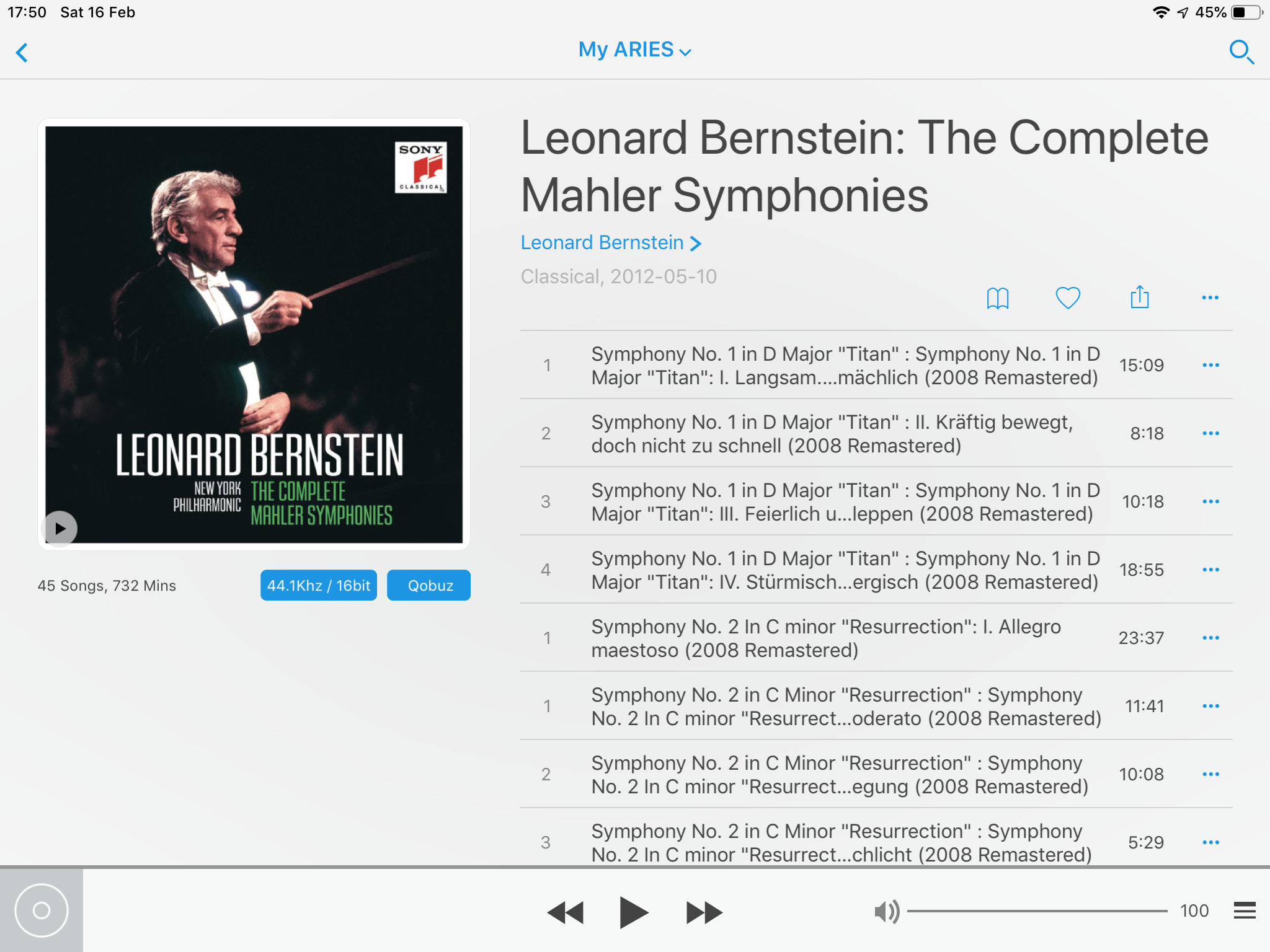
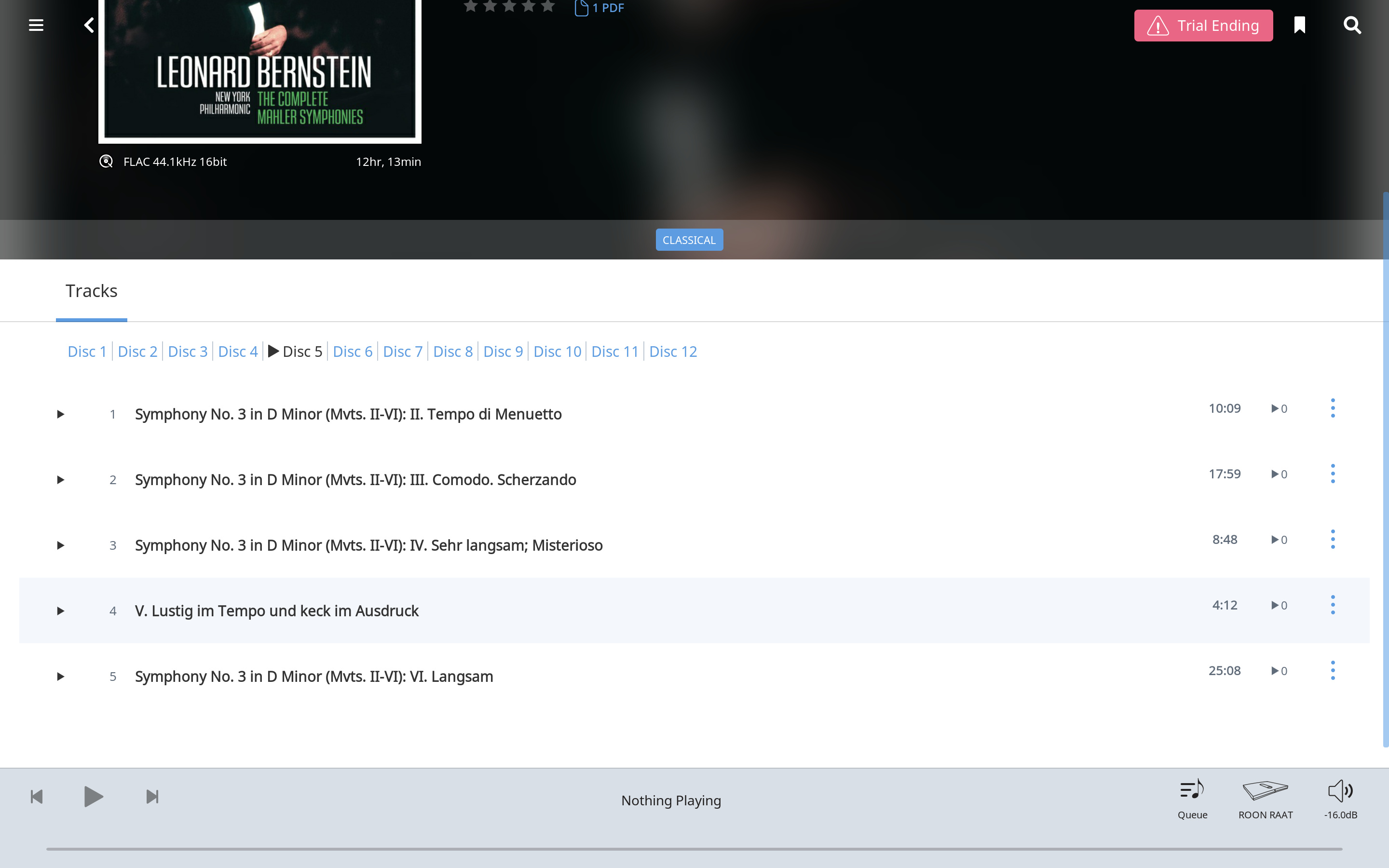
If you search ā€œBernstein Mahlerā€ in Qobuz the first thing you will get is the box set. Click on that and it will list all the tracks, click in whatever track you want and it will play from here.

In Roon Qobuz you have to choose the correct disk first and in the case of the 2nd and 3rd they are each spread over two discs, so you have to play the first one and add the second one to your playlist.

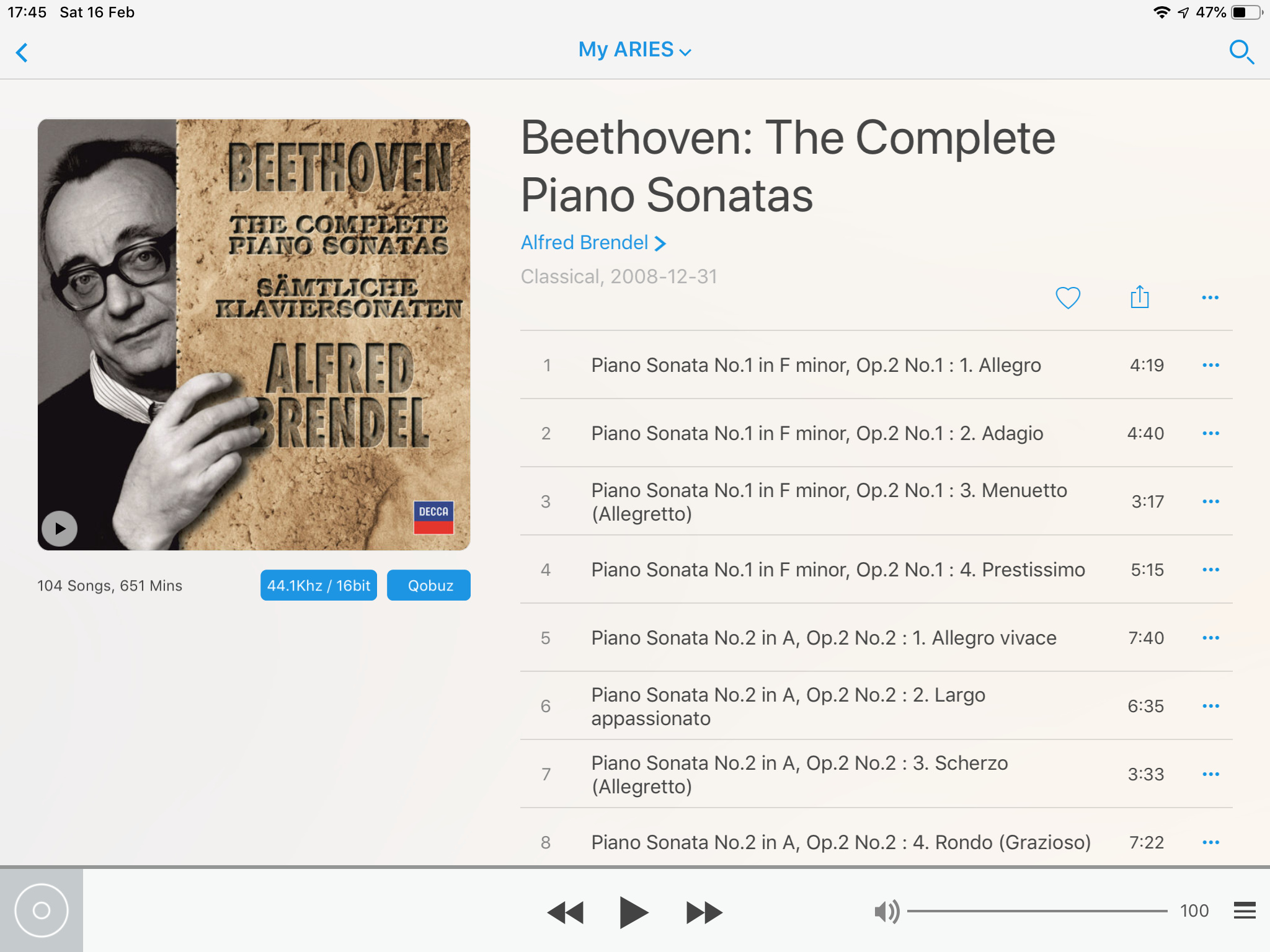
When you get around to Beethoven piano sonata sets it gets very difficult to find what you want in Roon, in fact when you eventually find it you get track but movement but no sonata headings, which is useless. Qobuz in OSX and in Lightning it is a lot easier. The Lightning Qobuz search is shown below, along with the useless Roon one.

Lightning

Roon

Roon
41

Lightning
PNG

Thank you!