You would see “PS Audio Output” from the Mk1 but “Primary Play Interface” for the Mk2, in my experience.
Thanks for input. For MKII: In Mac Midi with all connections in place and USB selected I get “Built in Output” and nothing else.
In TIDAL I get: 1. “System Controlled” with check mark
2. “Internal Speaker”
3. “Built in output”
4. my remote Home theater receiver which is on line
Thanks for your help.
Replying to vkennedy61 and Ted
I initiated a support request with Aurender. It will be interesting to see if their remote diagnostic capabilities will shed any light on the issue.
You can initiate a support request from within their Conductor app, and I noticed that the status info that is captured shows the device the Aurender is “talking” to.
Ted
I wanted you to know I have resolved the issue of the interrupted playback from the Quad Rate files I have been trying to play in JRiver Media Center. It was an issue with the laptop I was using. I tried using another laptop. I installed Media Center 28 and configured it properly. I then tried a number of Quad Rate and Single Rate files and they play fine! They sound great via the Mk2.
Sounds broke to me. That is - it is not seeing the Mk2. Tried a different USB cable?
I am on 2.3.0 and have not attempted any firmware or FPGA changes since getting my beta unit based on Aaron’s instructions (I’ve not experienced any muting). However, when I toggle to the “FPGA Load” screen, it’s just blank, no 173 nor 178 shown. Not sure what that means for which FPGA version I’m on?
Do I need to have the USB with those versions there in the root drive to see them on that screen?
Yes you need to have the USB drive inserted with the files in the root directoy to see them under the system. You can see the current UI firmware and and fpga from the home level.
Hi @sixpack1. Would you be so kind and describe the MC28 settings you used to get the DSD files to play? I’ve been using MC for years with DSJr successfully. I’m curious if I’ll need to change my existing MC28 settings when I get the MKII when general release hits. I use WASAPI.
Many thanks.
George
This would be a great, how to, procedure for the manual. Just in case the technical writer, or whomever writes the documentation, is listening.
Also you have to have the USB stick with the FPGA images on it plugged in when the DS Mk II boots for it to show up in the load FPGA menu.
Thanks for the tip. I have the Curious USB cable that Paul recommended a while back. It was not the cable but it was the separate 5 volt power supply. I used a cheap cable and it worked. Then I plugged in the Curious w/o PS and it works and USB/Tidal never sounded so good compared with MKI USB. I thought that the PS was needed and never tried without. I will leave USB going to make sure there is no drop out. Thanks again for your SOUND advice. Best Joe
Bueno!
I’ve been pretty knocked out by the sound of a laptop playing files from HD to USB on this thing.
I am using JRiver 29 under the tools pull down go to Audio select the PS Audio Extended Resolution WASAPI. Than move down to device settings. In here select open device for exclusive access. Bitdepht Automatic, Buffering 100 ms. Select ok. Move down to volume, select volume protection. Settings go to Bitstreaming select DSD. After that again select OK. You should be good to go! These settings will be the same for MC28.
I have opened a dialog with Aurender support. There is a DOP/DSD switch setting in the settings menu, which had been set to DSD, but but support suggested that I check it.
Sure enough, it was toggled to “OFF.” However, when I turned it on, the Aurender’s control app flashed the following:
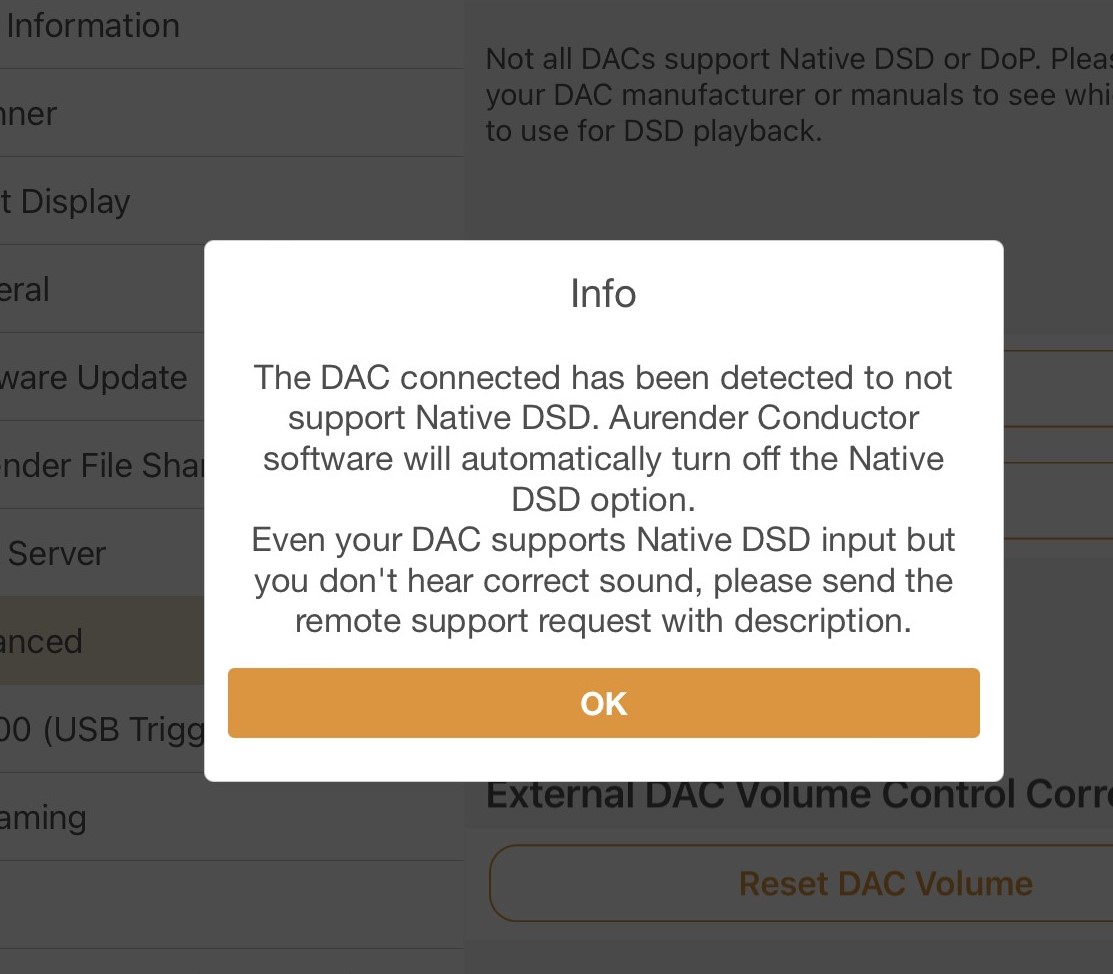
Aurender support is going to probe the MKII via its connection to the N100. It “sees” the DAC as follows:
“USB DAC : Async (705 Khz) PS Audio Extended Resolution US”
WIll let you know what they say. I’ll keep you posted.
My guess is that the Aurender code is setup for XMOS series of processors most with USB embedded. Now the DS Mk II uses ComTrue. They most likely need to update their OS to take this into account.
Since they are looking for XMOS, they aren’t going to recognize how ComTrue responds to a query for Native. This is oversimplifying the protocol, but it makes the point.
It also explains why DoP works, since that’s presented as PCM.
I am going out on a limb and going to say that this issue isn’t going to be confined to Sonore and Aurender. As more people test their “endpoints” there’s going to be more devices that need to use DoP vs. Native.
Thanks
Most likely correct, and I’m passing this info on to Aurender. but DOP and higher res PCM (greater than 96/24) donot play either.
Look like I may be hanging on to the Matrix for longer than expected…
Did you dork around with cables, rebooting etc…?
With some gear I’ve found the order you boot them up matters. For instance if you shut down the Aurender and the MKII, perhaps try bringing up the Aurender, let it full come up, and then turn on the DS.
the same problem is with MK1 Dac. as I know it’s the Xmos installed into MK1.
that’s why I need to use a Sonore converter between my MK1 and Aurender N200.
Folks:
Since I got USB/Tidal going 2 hours ago, there is no drop out and the sound is excellent compared with MKI. Karen Carpenter’s voice never sounded this good.
So now USB and I2S work with no drop out.
Thanks very much.