OK, I expect the problem will be that the HD Plex does not put out enough amps on the 12V output next to the 19V output to start up my Intel i5 powered 2018 Mac Mini. Whereas it suffices for your ARM-based Apple silicon. But it could still relate to the connector. Is the plug that you stick into your Mac 10mm or 14mm long?
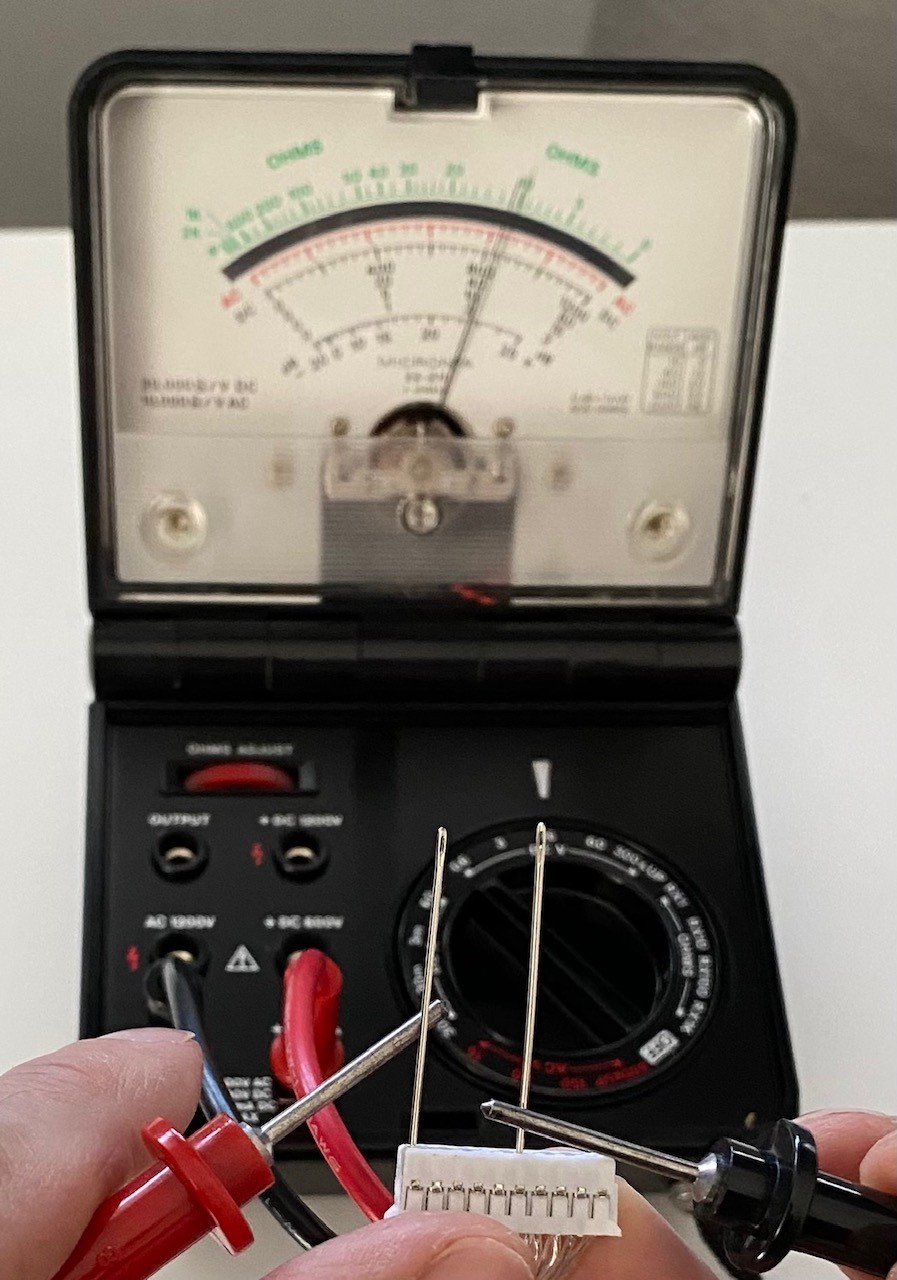
I was getting inconsistent, i.e., none initially, connection with the 10mm long HD Plex plug into the TeraDak. There was a steady zero volts reading from the TeraDak on the multimeter. And then, one time, there was a little spark when plugging in and suddenly there was a 12V reading. Picture below. This was then repeated. So I packed the TeraDak back into the Mac Mini and gave it go. But no lights, and nothing from the Mac Mini.
I probably will order a dedicated LPS for the Mac Mini with more amps. Though that is investing in an old Mac Mini further. Al’s point that a new M1 is inexpensive is a good one. I might just put an M2 Pro on the Christmas list though. In the meantime, I can power one of my DACs from the HD Plex and sell the LPS for that DAC instead. Might actually make money
The thing about my BACCH-SP adio MKII is it came with a processor in it. This processor is out of date and not up to the newer software the MKIII version can run. They will upgrade my machine (soon I hope) for around $3500. How many Mac Minis can you buy for that. If you have an M2 processor in your mini you can run software I can’t. Until I upgrade. So to me it seems obvious that if you can buy an M2, buy an M2.
I don’t think your issue is HDPlex300 it can output 13 amps either high output rail before it shuts down. 10 amps all day long on both. I will measure the oyaide connector tomorrow I can’t believe the old mini is you run is such a current hog. My M-1 has no memory slots. I would consider an upgrade it will work netter with DSP-13.
Thanks both. I have a 200W 12V LPS coming anyway. Got a good deal in France and even if is not needed, should be able to sell it with no loss in Germany. Although the M1 has the same 150W SMPS in it that the old Intel-equipped 2018 Mac Mini has, apparently the M1 uses a third the power that the 2018 Intel-equipped unit does. And I also have to power the microphone interface and the video camera after the Intel. The M2 also uses a 150W power supply. But the M2 Pro is 165W. I want to write to TeraDak to check on compatibility. Might be why they only list 2018-2020 compatibility and not 2022. No rush yet though. My Christmas solution might be a step down from the M2 Pro, but with more RAM on board from the factory, since RAM is no longer upgradeable apparently. I have been in and out of the 2018 unit five times now. So am confident I can restore it to original spec for used resale. It has been a lot of fun. Also setting it up for dual-boot with Windows, which I am not using actually on the Mac Mini, was fun. Will report back in a week or so once the LPS arrives from France.
Closely following your experience as I am interested in doing this mod as well. I’ve read that some have had difficulty in getting the original SMPS out of the chassis. Did you run into any issues with this or anything else that might be of note?
I will say that the experience of using an M1 Mac Mini over any prior generation is night and day. I also have an M1 Pro MacBook Pro, and can say that the Pro is probably unnecessary and not performance that you would be able to see without saturating the processor. The RAM is now embedded in the chip, so upgradable memory isn’t a thing in that context, but the upside is that it is much more efficient. I opted to get 16 GB with my M1 Mac Mini, and I’ve never seen “Swap Used” go over 0 bytes in the entire time I’ve owned it. My maxxed-out i7 MacBook Pro always has some swap memory utilization, and it has 32 GB of RAM.
One item that often is not mentioned in the videos is that a T6H security torx screwdriver or bit is needed to get the case open. This has a hollow tip. Once inside, it is all normal torx. Usually T6. But T10 for the motherboard. And T5 if doing a RAM upgrade on an old 2018 Intel unit like mine.
PS: Intranet info that the 2018-2020 Mac Mini uses a normal ATX 20-pin connector with varied voltages by pin are totally wrong. When Apple upped to 150W in 2018, they just spread the increased amps over more pins at 12V. This is the correct pinout info. I confirmed this with a multimeter.
Just wanted to close the loop with you that I received a pair of 1/4” TS to RCA cables today and now have the option to run my vinyl subsystem through BACCH. I have balanced cables between my phono preamp and the BHK pre for “normal” two-channel and the TS/balanced cables between the phono pre and the BabyFace for added BACCHness. Edgar helped with the TotalMix FS settings and all is good. As you suggested, I took a few snapshots within TotalMix to ensure the ability to return to stability if I mess something up down the road.
Relative to sonics, first impressions are that the soundstage when running through BACCH is (no surprise) more expansive and enveloping than the pure analog vinyl chain. Actual sound quality; however, is better with the non-BACCH thread. I attribute that to a couple of factors. First would be the inevitable degradation, to some degree, of the A/D and then D/A conversion associated with the BACCH thread. Secondly, my vinyl setup is pretty good: Rega P10, Rega Aura phono pre and Rega Aphelion 2 cartridge (almost as much invested in the cartridge alone as I have in BACCH… ) I think both will have their place in future analog listening sessions.
Thanks again for the suggestions provided in your response to my original post.
@Vmax OK, the race is on, does a single new 14mm DC connector arrive first from China, or the new linear power supply from France! Am waiting to see how everything shakes out with the equipment boxes before changing DC cables in general though. I might want to build my own XLR ones. And I have a good GX16 DC cable already for the LPS that is coming from France. The DC cables from HD Plex are not shielded. But at least everything else that they snake between for now is shielded.
@ViperRGD So happy to hear that the vinyl analog input functions! Unfortunately it is also my experience that no one system is optimal for playback of every recording or music type. Based on my experience so far, though, BACCH is my favourite most of the time. And I am still working on optimizing the signal path, e.g., do I stay with USB from Mac Mini direct to PSA DS MK2, or do I put a digital interface in between. I am seeing that the Audio-GD DI-20HE is discontinued. But it is perhaps more than I need. I probably will post a query on the DS MK2 USB thread.
My 2 cents. I started my Bacch4 mac journey with a USB to I2s DDC matrix spdif2 with a Dragon HDMI. It sounded fantastic but I was meeting with Edgar every few days to dort out why Bacch was crashing and setting faults I could not recover from by myself . Finally Edgar determined the DDC reclocking was the culprit. The error was an issue that he had seen early in Bacch DSP development. He suggested to ditch the DDC and send USB directly to MK2. The sound Quality was a little lesser using a Inakustik Referenz USB compared to AQ Dragon HDMI until I spent Dollars on this Silver Referenz USB. This Pure Silver Referenz USB makes a Dragon i2s sound very artificial and unnatural in the highs and it goes lower in bass. I also run with galvanic isolation USB input ground lifted.
I am very happy with this feedback. Thank you. I spent lunch break researching digital interface products including boards for DIY. Also went through posts complaining about Mac Mini USB for the last ten years. I admit this lunch went over-long. In the end I opted to order a silver USB cable! Not quite as nice as yours. But also a local product for me. Actually, Inakustik is like a five hour drive from me. But I have jokingly considered in the past to drive by for some dumptster diving to see if I could dig up some factory rejects!
Happy day, yesterday. The 200W 12V linear power supply arrived from Audiophonics in Bordeaux. The 2018 Intel-equipped Mac Mini started up right away after almost a week of sitting there. I could not check though if 14mm vs 10mm made a difference for the connector. It turns out that my Teddy Pardo LPS and nice cable… with a 10mm connector… have opposite polarity from Audiophonics. I opted not to put 200W through the TeraDak the wrong way around by combining the Audiophonics LPS with the Teddy Pardo cable.
It does not really count as A-B testing to wait a week before comparing with and without the LPS. But I am noticing improvement in how Tidal streaming sounds through the Mac Mini now that there is an LPS there and not the SMPS. Also, comparing BACCH4Mac against HQPlayer direct to the PSA DS MK2 DAC, is different. Before I was critical of how individual notes sounded via the Mac… also with default non-BACCH mode activated. Now it is more about the presentation of a piece. Direct from HQPlayer streamer to the DAC, the soundstage is compressed relative to playback with BACCH. This can be cool with a bass line coming across really strong. But the BACCH 3D experience is much cooler overall.
I am happy I can playback both ways. But my default will be with BACCH.
PS: I added a silver cable at the same time. But I am sure that does not matter…
New Software Again! Sounds like possibly better sounding.
Dear BACCH-dSP user,
Theoretica Applied Physics is pleased to release version 13.5 of its industry-leading spatial audio application, BACCH-dSP. As described in more details in the Release Notes at the bottom of this message, this new version includes new features and a number of improvements to all editions (Intro, Audiophile, Audiophile+, and Pro) of BACCH-dSP.
In particular there are significant improvements to the upsampling algorithm and processing efficiency, as well as enhancements to the stability and functionality of BACCH-dSP.
BACCH-dSP 13.5 can run under the latest Mac OS, Ventura 13.52 , as well as all previous Mas OS versions down to Mojave 10.13**. Please do not update to a version of Mac OS past the present latest version (Ventura 13.5.2)**, before you hear from us confirming that BACCH-dSP is compatible with that Mac OS.
Please note that head tracking now works only under the Ventura and Monterey Mac OS (12.x and 13.x) , so if your Mac is running under the Big Sur Mac OS (11.x) or an earlier OS, and you wish to use the head tracking functionality (Audiophile edition and above), you would need to update your Mac OS to at least Monterey (12.x) or preferably to the latest version, Ventura 13.5.1, before updating BACCH-dSP to version 13.
Please follow the instructions below to update the BACCH-dSP application on your computer. Please choose Option A if you are updating from version 12.1.5 or above, or Option B if you are updating from a version prior to 12.1.5. Option A will not overwrite your existing BACCH or change your existing BACCH-dSP settings.

 ) I think both will have their place in future analog listening sessions.
