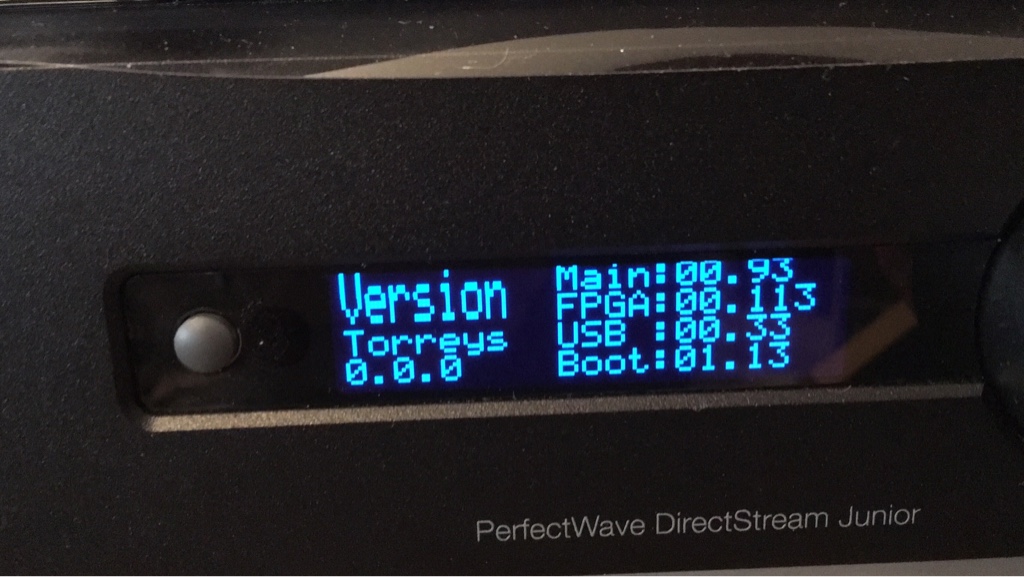
When I first tried the Torreys, I got some buzz and static out of the left speaker. So, I powered the Junior off from the back and then powered it back on. This fixed the problem.
I have tested the Toslink, RCA, and USB inputs and everything works fine. I tried 96, 192, and DSD on the USB and all of it works.
As far as the sound goes from early listening, I am hearing more detail and the instruments have more separation. I plan on doing some more listening today.
I have a Ethernet cable hooked up, but have never been able to get it to work with JRiver. A week or two ago, I was able to install the bridge update, so this validates that it is connected to my network. Puzzling!
I also would like to thank Paul, Ted, and Dennis for working over the holiday weekend. Just validates my purchase with this kind of support.
wizardofoz said
After 6 hours I turned it off. Waited 30 seconds and restarted. Rechecked for bridge update and non indicated but I'm not sure how to check the current version.
Torreys is still indicated. No time to get a good listen now but will do so tmro.
It should only take about 10 minutes, if it takes longer than 30 just reboot.
The bridge update that is showing up for some people is not the Roon update, it is an update to version 1.2.3. The Roon update will be availible later this week, probably wednesday or thursday. We are still working out one issue with the Roon module Code.
With Input set to Auto, I am hearing a small “tick” at the beginning of each cut, even of the same album/same sample rate, etc. I had not heard this before except on occasion with changes of format/sample rate. Occurs independent of digital input, e.g. Roon via USB, laptop via optical, coax from Oppo 105 playing a CD. Also independent of album format/sample rate (DSD, 24/96, 16/44.1, etc.).
Additionally - I had not noticed it before - but the display briefly goes back to showing DSD between cuts, then re-aquires the given sample rate (may have been happening, not sure). The Lock light remains lit, but the display switches from whatever the album is (e.g. 16/44.1) to DSD for a second, and then back.
Seems to NOT TO BE AN ISSUE if you select the specific input rather than the Auto Input.
Do you have a Force of Yale? I tried to reload Yale to check if that would fix it, and I have the same load issue as with the Torreys. The USB stick is MBR, reformatted, ejected properly, etc.
Thanks. I’m not in any rush, BTW, but would be happy to check it.
Is there a chance that you have another input playing some DSD that the Jr reverts to between tracks? In auto mode it goes to the last input that’s still playing when any input stops (or plays all 0’s, e.g. from a pause.)
Still things that play gaplessly shouldn’t switch since there shouldn’t be a gap to switch in.
Yep, my bad - this week I turned the gain up on the NPC near the top of its range, as my Benz Glider H2 is low enough output that I was having a hard time gain matching it with the other sources. It is triggering the Auto input with nothing on the TT.
I am used to having the phono stage of a VTL TL2.5 preamping it, which, having a separate volume control, allows for more output gain. I’m trying to just use the Junior as hub for everything. Thinking about getting a higher OP cart, but I guess I might still have the problem.
I’ll either have to turn it down between uses, accept the ticks or select sources manually, though I really like the Auto input feature. I was surprised that I could put a record on after a digital source, and it would catch the whole needle drop. Guess I know why now!
Thanks Ted. And thanks for the Junior. It’s a really wonderful device. I’m one of those weirdos who has thought the sound of 1 bit to be more natural since day one. Day one being the early Sony convertor and the yellow Sport Discman I had, whose mini stereo out was shockingly good hooked up to a respectable stereo.
But I started out recording (I’m a video and audio producer/musician) all analog, and when it came in, the sound of PCM always bugged me despite the initial thrill of it ; )
as you can see from my image post there is no version shown, either before the attempted update to the bridge nor after its the same…both for YALE and Torrey’s however I only noticed the bridge update screen after I did the Torrey’s upgrade.
Its no longer indicating there is an update so I assume it’s either done it or the update process is not seeing anything new now.
I know Monday is a holiday there but appreciate those who are on board helping us out. Hope you get a nice long weekend despite our giving feedback and notifications of any observations.
as you can see from my image post there is no version shown, either before the attempted update to the bridge nor after its the same…both for YALE and Torrey’s however I only noticed the bridge update screen after I did the Torrey’s upgrade.
Its no longer indicating there is an update so I assume it’s either done it or the update process is not seeing anything new now.
I know Monday is a holiday there but appreciate those who are on board helping us out. Hope you get a nice long weekend despite our giving feedback and notifications of any observations.
Email me directly at dennis@psaudio.com on Tuesday and I’ll help you out.
its no longer indicating there is an update so I assume it’s either done it or the update process is not seeing anything
Try to attach to the bridge with MC21 or whatever program that can attach to the bridge.
If it responses as "BridgeII", then it didn't program the bridge, if it responses with "PSAudio DS", your good to go. It took a while to respond as "PSAudio DS", it kept showing "BirdgeII", but when you clicked on it, it disappeared, but finally came up as "PSAudio DS"
Unfortunately I renamed it in J-River to “PS Audio DAC Jr” and for now it seems to appear as that for a bit then disappear again when I click on it. So I can’t play to it. I’ll try and ping/fing it and see what it’s seeing network wise. Maybe reboot everything again too. J-River did work for streaming earlier so I know it was working before Torrey’s went on Jr.
Looks like I might need to get a message to Dennis on Tuesday. Must be some way to force a USB Bridge code load I hope.
Looks like after several attempts to click on it it has remained connected and I was able to play something to it I think…at least the Volume lowered on the unit when I pressed play.
I wasn’t able to delete the edited name and have it pick up what is there, but Windoze is showing it as BridgeII in the network view of media devices so I guess its there without the update to 1.2.3 perhaps
I have to dash out now but will check it later with more time to dig.
This is very minor, but it is still strange. When I first power on the Junior and my Oppo 105, the display reads PCM 32K 24 bit. This is before I put in a disk. Once the disk is put in, the correct sampling and bit rate are displayed.
The DS does support 32k PCM and it is receiving samples from the Oppo at 32k if it says it is. The Oppo is a little sloppy about clock rates, especially when it’s cold. And the clock wanders way off when it is stopped and/or modes are switched. (Some other SACD/DVD/Blu-Ray seem to do this too.) The original DS software supported a +/- 100ppm deviation from the nominal clock rate (the Redbook standard) but we modified that to +/- 100,000 ppm (or so) to handle the large variation in clock rates from the Oppo.
I know Paul said to not judge the sound quality, but after a weekend of listening, I would have to agree with David about the female voices being rough or somewhat harsh. The voicing is somewhat bright for my tastes and I hope it will be tamed a little with the final release. I know it is a balancing act to extract the most amount of detail versus having a smooth sound.
Of course my words are empty - how can you NOT judge the sound quality. I just didn’t want folks to panic when they hear it. You can see what we’re up against and why these need voicing. So far, and correct me if I am wrong, the beta testing hasn’t found any real flaws? Or did I miss some? I am halfway around the world right now and while that shouldn’t affect my brain too much, it’s easy to miss things.
Paul McGowan said
Of course my words are empty - how can you NOT judge the sound quality. I just didn't want folks to panic when they hear it. You can see what we're up against and why these need voicing. So far, and correct me if I am wrong, the beta testing hasn't found any real flaws? Or did I miss some? I am halfway around the world right now and while that shouldn't affect my brain too much, it's easy to miss things.
I have not found any issues with my testing over the holiday weekend. It seems solid for my needs and uses.
 I just didn’t want folks to panic when they hear it. You can see what we’re up against and why these need voicing. So far, and correct me if I am wrong, the beta testing hasn’t found any real flaws? Or did I miss some? I am halfway around the world right now and while that shouldn’t affect my brain too much, it’s easy to miss things.